I’d had the idea in my head for a long time: a simple CRM, built right into my own WordPress site, for capturing and following up with potential AI consulting clients — no bloated features I’d never use, no dashboard I’d have to learn.
Every time I looked at the WordPress plugin marketplace, the options were either a one-off purchase or a recurring monthly fee for a tool built for someone else’s workflow, not mine. So instead of paying for a CRM that almost fit, I asked Claude to build one that actually did — one I could shape around exactly how I plan to capture and follow up with leads, and keep iterating on as my needs change.
Here’s the actual build journey — problem, action, outcome — end to end.
A Lesson From My Siebel Days
Some context on why this approach felt natural to me: early in my career I was a Siebel CRM developer. Siebel was — and honestly still is — a remarkably capable, feature-rich enterprise CRM, one of the most complete platforms on the market in the early 2000s. But I watched the same pattern repeat at nearly every client: they paid enormous licensing fees for a platform whose depth they actually used maybe 10–30% of.
That gap is a big part of what made Salesforce.com’s rise so effective. Salesforce’s pitch wasn’t “we do everything Siebel does” — it was almost the opposite: ship a lean core that covers 80–90% of what most businesses actually need with a much lower subscription fees and “no software” means it runs on the cloud = quick adoption (no hardware to purchase and no software installation required), and let an ecosystem of independent companies build “plugins” for whatever’s missing. Same logic WordPress runs on today, just a different era and a different vertical.
That background is exactly why I didn’t reach for an all-in-one CRM SaaS platform here — and why I didn’t feel like I needed one. I’ve seen firsthand how much of an enterprise CRM’s feature set goes unused by any single business. So building a lean “core” myself, scoped precisely to what I actually need, and only adding capability when I actually hit a wall, is the same 80/20 principle I watched play out at Siebel clients twenty years ago — except this time, I don’t need an ISV marketplace either. I can just ask Claude to build the “plugin” myself, exactly when I need it.
Stage 1: The MVP — capture leads, see them in one place
Problem: I didn’t have a system yet, and I didn’t want to adopt someone else’s. I needed something simple and specific: a signup form I could drop on my site to capture a name and email, and a place to see everyone who’d come in, ready for the workshops and outreach I’m planning.
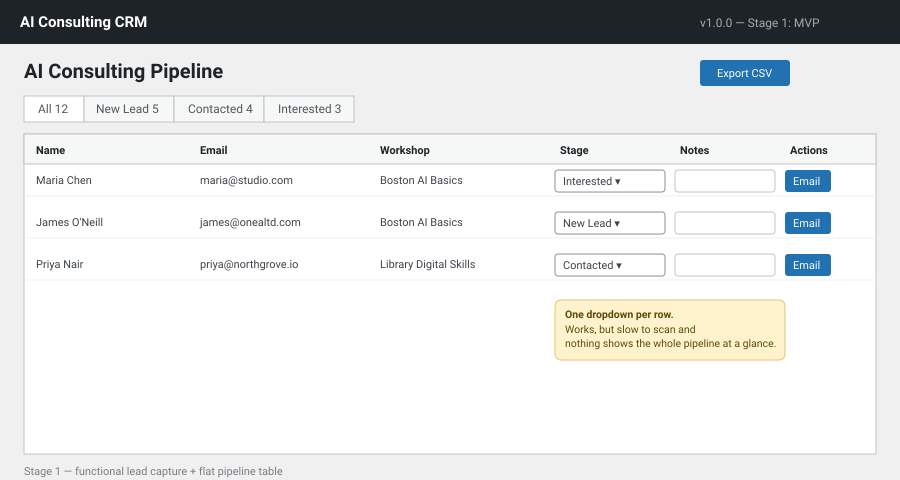
Action: I asked Claude to build a WordPress plugin — a shortcode-based signup form for the front end, and a simple admin table on the back end, with a pipeline stage per lead (New Lead → Contacted → Interested → Proposal Sent → Client → Not Interested). Claude also added a one-click “Email” button that pre-fills a follow-up message from an editable template and sends it through WordPress itself, logging the outreach automatically.
Outcome: Within the first working version, I had a real, installable plugin — not a mockup — with lead capture, a stage dropdown per row, notes, and CSV export.
Stage 2: “Did you actually check this is secure?”
Problem: A plugin that touches a public signup form and sends email on my behalf is also a plugin that touches real attack surface. I didn’t want to find out the hard way that it had a hole in it.
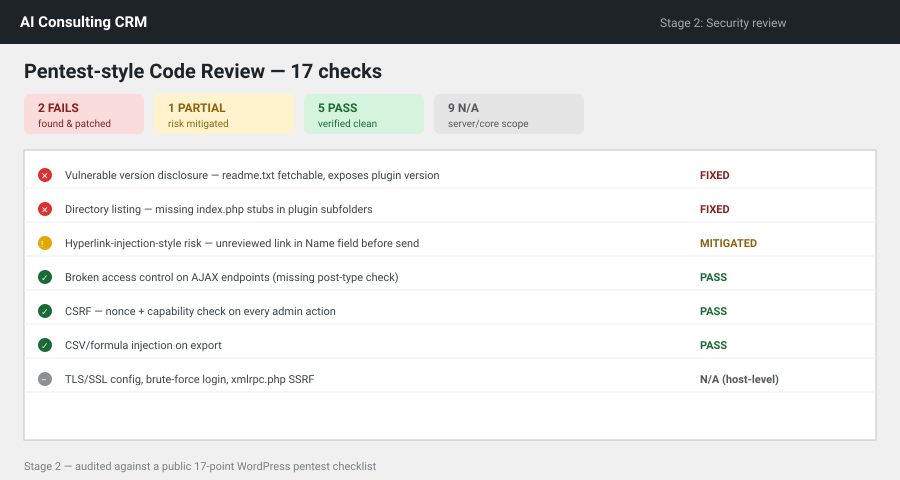
Action: I asked Claude directly whether it had scanned for vulnerabilities. It hadn’t done a full pass yet — and said so — then went back and actually audited the code: found that a delete action had no check confirming the ID it was deleting actually belonged to the plugin (a real broken-access-control bug), found a CSV export that was vulnerable to formula injection from public form data, and added a honeypot + rate limit to the public capture endpoint. Then, when I pointed it at a public article listing 17 WordPress pentesting techniques, it went through the list one by one — pass, fail, partial, or not-applicable — and fixed what it found: a fetchable readme.txt disclosing the plugin version, missing directory-listing protection, and a spear-phishing-style risk where a lead’s “name” field could carry a malicious link into an email I’d later send.
Outcome: 2 real issues found and patched, 1 risk mitigated with a visible warning badge, 5 clean passes, and 9 items correctly scoped out as server-level, not plugin-level. Not a rubber stamp — an actual accounting of what was checked and why.
Stage 3: From “view leads” to “manage leads”
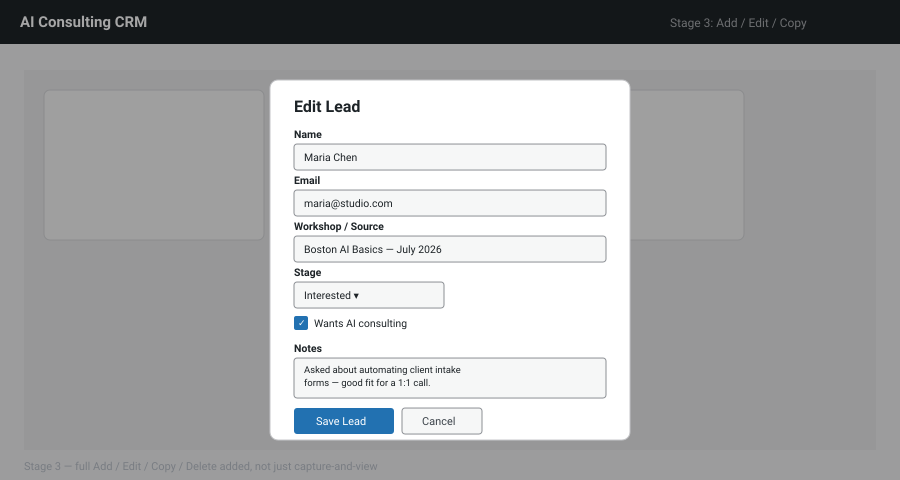
Problem: The MVP could capture and display leads, but I couldn’t manually add someone I met in person, fully edit a lead’s details, or clone an entry for a referral — only change stage and add a note.
Action: I asked Claude to add Add / Edit / Copy / Delete. It built a shared modal for adding and editing (same fields, less code duplication), a one-click duplicate for referrals, and kept the existing delete — while extending the same security model to the new endpoints: every new action checks the lead ID actually belongs to the plugin before touching it.
Outcome: A CRM that finally matched how I actually work — not just what came through the web form.
Stage 4: List view → Kanban
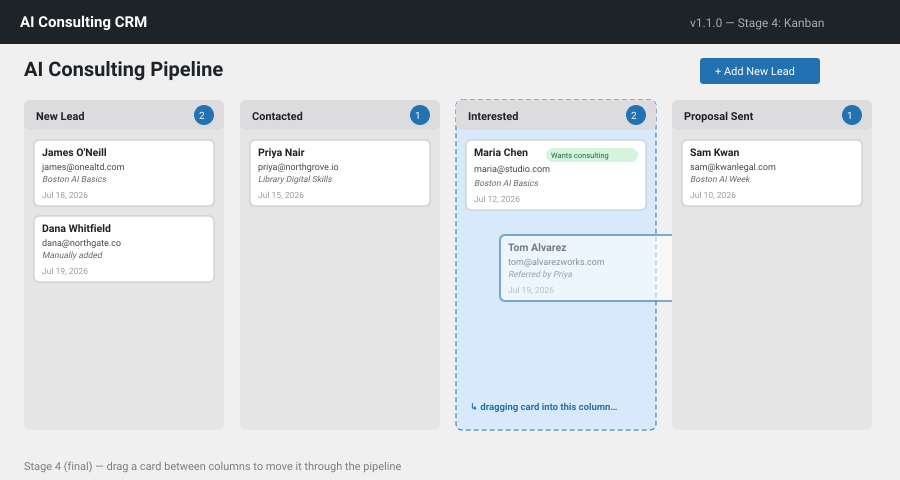
Problem: A per-row dropdown works, but it’s slow to scan and doesn’t show the shape of my whole pipeline at a glance — how many are stuck in “New Lead,” how many are close to becoming clients.
Action: I asked Claude to replace the dropdown with drag-and-drop. It restructured the admin page into a real kanban board — one column per stage, all visible at once — using native HTML5 drag-and-drop, with an optimistic UI update (the card moves instantly) that rolls back automatically if the server call fails, so the board never silently shows the wrong stage.
Outcome: The final version: a visual pipeline I can manage in seconds, not by scanning a table of dropdowns.
The Math: What Would This Have Actually Cost Me?
Before building, I looked at what was already out there — both WordPress-native plugins and SaaS CRM platforms. Here’s the real pricing, side by side:
WordPress CRM Plugins
| Plugin | Cost | Pricing Structure | Key Advantage |
|---|---|---|---|
| FluentCRM | Starts at $103/year | Flat annual fee for 1–10 sites | Best for native email marketing and sales funnels without limits |
| Groundhogg | Starts at $240/year | Flat annual fee + add-ons | Ideal for heavy visual automations and deep WordPress integration |
| Jetpack CRM | Starts at $199/year | Flat annual fee | Best for freelancers needing basic CRM and built-in invoicing |
| WP ERP | Free to $12.99+/mo | Free core, or per-user add-ons | Combines HR, Accounting, and basic CRM in a single dashboard |
SaaS CRM Alternatives
| CRM Platform | Entry-level Tier | Advanced Tiers | Key Gotchas / Limitations |
|---|---|---|---|
| HubSpot | $15/seat/month | From $890/month (Professional) | Advanced tiers mandate mandatory onboarding fees and jump in price as contacts increase |
| Salesforce | $25/user/month | Up to $550/user/month | Advanced features (like AI) require high pricing tiers; implementation is complex |
| Freshsales | $9/user/month | Up to $59/user/month | Basic tiers lack AI or sequences; costs scale linearly with larger teams |
| Folk CRM | $17.50/member/mo | Up to $35/member/month | Per-user pricing model; lacks enterprise forecasting depth |
What that actually means for a 1-person business
As a solo operator, I only ever need a single seat — but the pricing tables above still translate into real annual numbers:
- WordPress plugins (entry tier, 1 site): roughly $0–$240/year — the cheapest, closest-to-DIY option, but still a recurring fee for a generic tool, and several of these jump in cost fast once you add automations or extra sites/users.
- SaaS, entry tier (1 seat): roughly $108–$300/year — looks comparable to the plugins at first glance, until you need anything beyond the basics.
- SaaS, the tier that actually matches what I built (custom pipeline stages, automated follow-up templates, no per-contact limits): this is where it gets ugly. HubSpot’s Professional tier alone is $890/month — $10,680/year — for functionality that’s arguably simpler than the kanban board Claude built me in an afternoon. Salesforce’s advanced tier runs up to $550/user/month — $6,600/year, even for a single user.
My actual cost to build this myself: a Claude Pro subscription — $20/month (or $17/month billed annually), so $200–240/year — which I already pay for the AI consulting work itself, not as a separate line item for this plugin. No per-contact pricing, no per-seat fees, no advanced-tier upsell to unlock automation, and no vendor lock-in: I own the code outright, on my own WordPress site.
That puts the real cost of this tool at roughly the same price as the cheapest generic WordPress plugin — except it does exactly what I need, nothing I don’t, and I can keep asking Claude to extend it for free every time my workflow changes, instead of waiting on a plugin vendor’s roadmap or paying for their next tier up.
What Was My Time Actually Worth?
The subscription cost is only half the picture — I also spent real hours in the driver’s seat: specifying the MVP, reviewing the security findings, testing the new Add/Edit/Copy/Delete features, and checking the kanban redesign actually worked before trusting it with real leads.
Independent AI consultants in the Boston market currently bill in roughly the $100–$200/hour range for solo/early-stage practices (with boutique and enterprise-tier firms running $150–$500+/hour) — so I valued my own time at $125/hour as a fair mid-point for where I am right now.
Total hands-on time across building, security-testing, and iterating on features across all four stages: about 2 hours. At $125/hour, that’s $250 of my own time — on top of the ~$20/month Claude subscription.
Here’s why that number still works decisively in my favor: those same Boston market rates ($100–$300+/hour) are what I’d pay someone else to build this. A freelance WordPress developer scoping, building, and security-testing a custom CRM plugin from scratch isn’t a 2-hour job for them either — it’s realistically several days of work once you factor in back-and-forth revisions, meaning even at the low end of local rates, hiring this out would run well into four figures before a single line of it touched my site. Building it myself, with Claude doing the implementation while I directed and tested it, compressed days of billable work into a couple of focused hours.
So the full honest cost of this plugin — subscription plus my own time — is somewhere around $300–$500 all-in, not the $0 a “just prompt an AI” narrative might imply. But stacked against $10,680/year for the SaaS tier that matches its functionality, or several thousand dollars to commission the equivalent custom build, it’s still the cheapest path to a tool that fits exactly how I work — by a wide margin.
This isn’t “AI wrote some code.” It’s a full, iterative product-development loop, done conversationally, in about an hour:
- Requirements → working MVP (a real plugin, not a demo)
- Proactive + prompted security review (Claude flagged what it hadn’t checked, then went and checked it — twice, once on its own initiative and once against an external source I provided)
- Feature iteration based on how I actually work, not just what I originally specified
- UX iteration — replacing a working-but-clunky interaction pattern with a better one, without breaking anything underneath it
The honest caveat, because it matters: this is still a v1 tool for a single-person business, not an audited enterprise product. I’d still want a second set of eyes before this holds enterprise client data at scale. But for roughly $300–500 all-in — subscription plus my own time — versus $10K+/year for the SaaS tier that actually matches what this plugin does, this was an easy call.
If you’ve got a CRM, tracker, or internal tool idea that’s been sitting in your head because the marketplace options never quite fit — and you’d rather not pay a subscription for 80% of a solution — this is the kind of tool you can now build for yourself, in a single working session.
Building this in public because I think more solo consultants and small business owners should know this is possible now. Happy to share more on the build process if there’s interest.
#AI #WordPress #NoCode #SmallBusiness #AIConsulting #ClaudeAI #ProductDevelopment #Boston